Tuesday, 20 March 2012

How to Unfriend Facebook Friends in Bulk

, , , 0


Since Facebook is the Biggest Social Networking site online.Friend requests are common to our profiles and you can make friends online very easily but
Some times You May Have to Remove Your Facebook friends
Sometimes you need someone to be added to Ur profile and removing friends in Facebook is a pretty hard deal so we found an interesting article which can do this job like that.


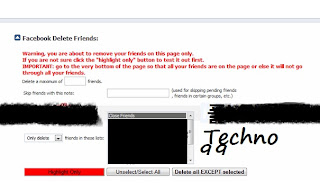
Facebook Deletes is the user-script for chrome and Firefox which does this job really easily, just installing it and giving it a command for deleting your whole bunch of friends list. 
Note :-For Firefox Grease Monkey Must be installed


Click On the image to enlarge


So after you installing  this script you just need to visit the Facebook Friends Page where you will see all your friends just click that downward arrow  and you will see that page   like above in the image.

Saturday, 17 March 2012

Create Ur Own Stylish & Big Image Emotions For Facebook

, 2


Tired of Using  Old Facebook chat emotions ???.Now try Something New to Impress Your friends Online..

smileyti.me

Smileyti.me Provides An excellent Procedure to create Emotions Online Specially For Facebook


 Just visit this  website http://smileyti.me/
 Now the page asks you to choose your image and than and upload to the site .


After Uploading Image to the site..It will Generate a Peice of code. 
Copy That code and Paste it to Facebook

That's it Guys.Well Now if u enjoy this Post Please Do comment Below..

By

saikiransama

No Rights Reserved

Friday, 16 March 2012

Sachin scores 100th international century

, , , , 5


Finally He Has Done it. "The Hundredth Ton"


Indian cricket icon Sachin Tendulkar, treated like God by his fan sand other cricketers, ended the long and tiring wait for his 100th international century on Friday at Dhaka'sShere Bangla National Stadium. After a long time.it was really a great record.that no one can break it up.

Sachin Tendulkar Hits 100'th ton :-


Sachin Tendulkar, the leading run scorer in the history of both Test and one-day cricket, achieved the most-coveted ton by taking a single off Shakib Al Hasan against Bangladesh in Asia Cup. Tendulkar's century came off 138 balls and was studded with 10 fours and a six. 

The master blaster's 99th century had come against South Africa on March 12, 2011, at Nagpur during the World Cup. Friday's century was Tendulkar's 49th in one-dayers; he has 51 Test centuries. 

Tendulkar, who was left Standed on 99 international hundreds for a year and four days, played Test series against England, the West Indies,pakisthan and Australia. He also featured in the recently concluded triseries in Australia but his bid to become the first batsman to score 100 international hundreds remained unfulfilled, although he came close on a few occasions. 

Tendulkar has defied age and injury at every stage of his career. Whenever injuries threatened to stall his career, he pushed his body to the limit, and sometimes even beyond. Even the most threatening of all his injuries - elbow (in 2004) - couldn't break him. He cried out in agony, waited with hope for almost a year, tackled it with determination and ultimately conquered it like only he can.  

Finally He is A Living Legend. No One Can Break His Records..Only he can Break His Own Record.


Thursday, 15 March 2012

New Smileys For Facebook Chat

3


Awesome Facebook Smiley codes Were Listed Here. You Must Check Out these and use in your Facebook chat to have a better chat experience than before.
So using these codes are Very simple  just copy only the codes from below paste them in chat.  


[[124193631030413]] – Michael Jackson
[[124195081030268]] – LOL
[[124201834362926]] – F*** Off
… [[124203091029467]] – Computer Icon

[[126236287388324]] – Love Code
[[126125527399400]] – Muaaach Kissing :*
[[126134560731830]] – Hoam Ngantuk Rek
[[126261164052503]] – Hula Hula
[[126221767389776]] – Spin Heart
[[126214010723885]] – Stroke
[[126386227373330]] – Oversleep Insomnia
[[389448181885]]    – Week
[[126539730695178]] – Love Shame
[[126540207361797]] – Love Smail
[[126232017388751]] – Broken heart
[[126229700722316]] – Pikachu
[[126392380706048]] – ready sleep
[[126276450717641]] – blast love ..tiupan cinta
[[126391564039463]] – Stress
[[110566632320002]] – Cat listening to music
[[126230590722227]] – Super Mario
 
[[124206401029136]] – Windows icon
[[124208857695557]] – Apple Logo
[[124211087695334]] – F*** off finger
[[124212967695146]] – Osama
[[124214267695016]] – Mr. Bean
[[124215331028243]] – Sun
[[124216534361456]] – Moon
[[124218417694601]] – Twitter bird
[[124219164361193]] – 8 Ball
[[124234194359690]] – PLT C
[[ForeverAloneComics]] – Forever Alone
[[MeGustaMeme]] – Megusta
[[164413893600463]] – Megusta 2
[[149333368464171]] – Yao Ming
[[116616581692281]] – TROLL Face
[[145768898802324]] – FUUUUUs
[[168456309878025]] – LOL
[[189637151067601]] – LOL 2

[[126213110723975]] – Hello Ketty
[[126227960722490]] – kiss
[[126230880722198]] – Green Worm Ani
[[126229327389020]] – Rose Red Ani
[[127868980561350]] – Heart beat
[[126220920723194]] – Santa
[[126216480723638]] – butterfly blue
[[126132024065417]] – Heart rotate ani
[[126278187384134]] – O Yeah Hippo
[126217194056900]]  – i ♥ u
[[389449726885]]    – i love you
[[126540207361797]] – Smileys Inlove
[[398699314236]]    – Teddy n ♥
[[110780922298250]] – Heart on Fire
[[127878643893717]] – hand Clap
[[398570519236]]    – mickey at Sleep
[[394930959230]]    – Smileys Zzzz
[[126398717372810]] – Converse
[[110563818986950]] – Wew
[[110566395653359]] – cat licking screen
 
[[FapFapFap.B]] – FAPFAP
[[106043532814443]] – Y U NO
[[214457085240151]] – Nothing to do here
[[129627277060203]] – Poker faces
[[160723207280093]] – You f***ing kidding me?
[[ChallengeAcceptado]] – Challenge accepted
[[100002752520227]] – Okay
[[105387672833401]] – F*** Yeah
[[224812970902314]] – Derp
[[192644604154319]] – Derpina
[[170815706323196]] – Cereal guy
[[142670085793927]] – Mother of God
[[168040846586189]] – Feel like a sir
[[249199828481201]] – Konata Izumi
[[250128751720149]] – Domo Kun
[[223328504409723]] – Gintoki Sakata
[[236147243124900]] – Pokeball
[[326134990738733]] – Pikachu
[[155393057897143]] – Doraemon
[[224502284290679]] – Nobita
[[144685078974802]] – Mojacko
[[334954663181745]] – Spongebob
[[196431117116365]] – Shin chan
[[138529122927104]] – Pedo Bear
[[269153023141273]] – Poring
[[332936966718584]] – Hello Kitty
[[252497564817075]] – Kerokeroppi
[[297354436976262]] – Santa Claus
[[157680577671754]] – Angry Bird 

Wednesday, 14 March 2012

About Internet

, 0


The Internet is a global system of interconnected computer networks that use the standard Internet protocol suite(TCP/IP) to serve billions of users worldwide. 


Well Coming to topic We all Are Using Internet Today in Our Pc's, Laptops ,Tablets,Smartphones And Mobile devices too.
It is a network of networks that consists of millions of private, public, academic, business, and government networks 

Well Every system which is connected to internet uses a specific IP Adress usually the INTERNET PROTOCOL Provided by the internet service provider.it is in the format of 255.255.255.255 the numbers must be in between 0 and 255.

How stuff works ]

When we open Our browser and type an address..Actually we are connected to the specific Host server. So When We type an URL or address then we are sending the address of the server in the form of URL.Then the service provider receives our URL 
as a request and it searches for what we are looking in its Huge Database. And responds to us in a fraction of seconds.Actually the data We enter will be sent will be converted into packets of data. and it is received by the server.and again the server Returns the data we are requesting in the form of packets .it travels all around and comes back to our browser in the form of a page like html or ht or any respective page the site is using..


ORIGIN


The origins of the Internet reach back to research of the 1960s, commissioned by the United States governmentin collaboration with private commercial interests to build robust, fault-tolerant, and distributed computer networks. The funding of a new U.S. backbone by the National Science Foundation in the 1980s, as well as private funding for other commercial backbones, led to worldwide participation in the development of new networking technologies, and the merger of many networks. The commercialization of what was by the 1990s an international network resulted in its popularization and incorporation into virtually every aspect of modern human life. As of 2011, more than 2.2 billion people — nearly a third of Earth's population — use the services of the Internet.
The Internet has no centralized governance in either technological implementation or policies for access and usage; each constituent network sets its own standards. Only the overreaching definitions of the two principal name spaces in the Internet, the Internet Protocol address space and the Domain Name System, are directed by a maintainer organization, the Internet Corporation for Assigned Names and Numbers (ICANN). The technical underpinning and standardization of the core protocols (IPv4 and IPv6) is an activity of the Internet Engineering Task Force (IETF), a non-profit organization of loosely affiliated international participants that anyone may associate with by contributing technical expertise.

Terminology

Internet is a short form of the technical term Internetwork,  the result of interconnecting computer networks with special gateways or routers. The Internet is also often referred to as the Net.
The term the Internet, when referring to the entire global system of IP networks, has been treated as a proper noun and written with an initial capital letter. In the media and popular culture, a trend has also developed to regard it as a generic term or common noun and thus write it as "the internet", without capitalization. Some guides specify that the word should be capitalized as a noun but not capitalized as an adjective.
The terms Internet and World Wide Web are often used in everyday speech without much distinction. However, the Internet and the World Wide Web are not one and the same. The Internet establishes a global data communications system between computers. In contrast, the Web is one of the services communicated via the Internet. It is a collection of interconnected documents and other resources, linked by hyperlinks and URLs.

Technology

Protocols

The Internet standards describe a framework known as the Internet protocol suite. This is a model architecture that divides methods into a layered system of protocols . The layers correspond to the environment or scope in which their services operate. At the top is the application layer, the space for the application-specific networking methods used in software applications, e.g., a web browser program. Below this top layer, the transport layer connects applications on different hosts via the network (e.g., client–server model) with appropriate data exchange methods. Underlying these layers are the core networking technologies, consisting of two layers. The internet layer enables computers to identify and locate each other via Internet Protocol (IP) addresses, and allows them to connect to one-another via intermediate (transit) networks. Last, at the bottom of the architecture, is a software layer, the link layer, that provides connectivity between hosts on the same local network link, such as a local area network (LAN) or a dial-up connection. The model, also known as TCP/IP, is designed to be independent of the underlying hardware, which the model therefore does not concern itself with in any detail. Other models have been developed, such as the Open Systems Interconnection (OSI) model, but they are not compatible in the details of description or implementation; many similarities exist and the TCP/IP protocols are usually included in the discussion of OSI networking.
The most prominent component of the Internet model is the Internet Protocol (IP), which provides addressing systems (IP addresses) for computers on the Internet. IP enables internetworking and in essence establishes the Internet itself. IP Version 4 (IPv4) is the initial version used on the first generation of today's Internet and is still in dominant use. It was designed to address up to ~4.3 billion (109) Internet hosts. However, the explosive growth of the Internet has led to IPv4 address exhaustion, which entered its final stage in 2011, when the global address allocation pool was exhausted. A new protocol version, IPv6, was developed in the mid-1990s, which provides vastly larger addressing capabilities and more efficient routing of Internet traffic. IPv6 is currently in growing deployment around the world, since Internet address registries (RIRs) began to urge all resource managers to plan rapid adoption and conversion.
IPv6 is not interoperable with IPv4. In essence, it establishes a parallel version of the Internet not directly accessible with IPv4 software. This means software upgrades or translator facilities are necessary for networking devices that need to communicate on both networks. Most modern computer operating systems already support both versions of the Internet Protocol. Network infrastructures, however, are still lagging in this development. Aside from the complex array of physical connections that make up its infrastructure, the Internet is facilitated by bi- or multi-lateral commercial contracts (e.g., peering agreements), and by technical specifications or protocols that describe how to exchange data over the network. Indeed, the Internet is defined by its interconnections and routing policies.

Structure

The Internet structure and its usage characteristics have been studied extensively. It has been determined that both the Internet IP routing structure and hypertext links of the World Wide Web are examples of scale-free networks. Similar to the way the commercial Internet providers connect via Internet exchange points, research networks tend to interconnect into large subnetworks such as GEANT, GLORIAD, Internet2, and the UK's national research and education network JANET. These in turn are built around smaller networks (see also the list of academic computer network organizations).
Many computer scientists describe the Internet as a "prime example of a large-scale, highly engineered, yet highly complex system". The Internet is heterogeneous; for instance, data transfer rates and physical characteristics of connections vary widely. The Internet exhibits "emergent phenomena" that depend on its large-scale organization. For example, data transfer rates exhibit temporal self-similarity. The principles of the routing and addressing methods for traffic in the Internet reach back to their origins the 1960s when the eventual scale and popularity of the network could not be anticipated. Thus, the possibility of developing alternative structures is investigated. The Internet structure was found to be highly robust to random failures and very vulnerable to high degree attacks

Data transfer


File sharing is an example of transferring large amounts of data across the Internet. A computer file can be emailed to customers, colleagues and friends as an attachment. It can be uploaded to a website or FTP server for easy download by others. It can be put into a "shared location" or onto a file server for instant use by colleagues. The load of bulk downloads to many users can be eased by the use of "mirror" servers or peer-to-peer networks. In any of these cases, access to the file may be controlled by user authentication, the transit of the file over the Internet may be obscured by encryption, and money may change hands for access to the file. The price can be paid by the remote charging of funds from, for example, a credit card whose details are also passed – usually fully encrypted – across the Internet. The origin and authenticity of the file received may be checked by digital signatures or by MD5 or other message digests. These simple features of the Internet, over a worldwide basis, are changing the production, sale, and distribution of anything that can be reduced to a computer file for transmission. This includes all manner of print publications, software products, news, music, film, video, photography, graphics and the other arts. This in turn has caused seismic shifts in each of the existing industries that previously controlled the production and distribution of these products.
Streaming media is the real-time delivery of digital media for the immediate consumption or enjoyment by end users. Many radio and television broadcasters provide Internet feeds of their live audio and video productions. They may also allow time-shift viewing or listening such as Preview, Classic Clips and Listen Again features. These providers have been joined by a range of pure Internet "broadcasters" who never had on-air licenses. This means that an Internet-connected device, such as a computer or something more specific, can be used to access on-line media in much the same way as was previously possible only with a television or radio receiver. The range of available types of content is much wider, from specialized technical webcasts to on-demand popular multimedia services. Podcasting is a variation on this theme, where – usually audio – material is downloaded and played back on a computer or shifted to a portable media player to be listened to on the move. These techniques using simple equipment allow anybody, with little censorship or licensing control, to broadcast audio-visual material worldwide.
Digital media streaming increases the demand for network bandwidth. For example, standard image quality needs 1 Mbit/s link speed for SD 480p, HD 720p quality requires 2.5 Mbit/s, and the top-of-the-line HDX quality needs 4.5 Mbit/s for 1080p.
Webcams are a low-cost extension of this phenomenon. While some webcams can give full-frame-rate video, the picture either is usually small or updates slowly. Internet users can watch animals around an African waterhole, ships in the Panama Canal, traffic at a local roundabout or monitor their own premises, live and in real time. Video chat rooms and video conferencing are also popular with many uses being found for personal webcams, with and without two-way sound. YouTube was founded on 15 February 2005 and is now the leading website for free streaming video with a vast number of users. It uses a flash-based web player to stream and show video files. Registered users may upload an unlimited amount of video and build their own personal profile. YouTube claims that its users watch hundreds of millions, and upload hundreds of thousands of videos daily.

Article by
Saikiransama


Tuesday, 13 March 2012

A Brief Description On Android OS

, 5


ANDROID :-


Android is a Linux-based operating system for mobile devices such as smartphones and tablet computers. It is developed by the Open Handset Alliance led by Google.[10][11]
Google purchased the initial developer of the software, Android Inc., in 2005.[12] The unveiling of the Android distribution in 2007 was announced with the founding of the Open Handset Alliance, a consortium of 86 hardware, software, and telecommunication companies devoted to advancing open standards for mobile devices.[13][14][15][16] Google releases the Android code as open-source, under the Apache License.[17] TheAndroid Open Source Project (AOSP) is tasked with the maintenance and further development of Android.[18]
Android was listed as the best-selling smartphone platform worldwide 

Foundation


Android, Inc. was founded in Palo Alto, California, United States in October, 2003 by Andy Rubin (co-founder ofDanger),[26] Rich Miner (co-founder of Wildfire Communications, Inc.),[27] Nick Sears (once VP at T-Mobile),[28]and Chris White (headed design and interface development at WebTV)
Acquisition by Google
Google acquired Android Inc. on August 17, 2005, making Android Inc. a wholly owned subsidiary of Google Inc. Key employees of Android Inc., including Andy Rubin, Rich Miner and Chris White, stayed at the company after the acquisition.[12] Not much was known about Android Inc. at the time of the acquisition, but many assumed that Google was planning to enter the mobile phone market with this move.

Open Handset Alliance


On November 5, 2007, the Open Handset Alliance, a consortium (A consortium is an association of two or more individuals, companies, organizations or governments (or any combination of these entities) with the objective of participating in a common activity or pooling their resources for achieving a common goal.)  of several companies which include Broadcom Corporation, Google, HTC, Intel, LG, Marvell Technology Group, Motorola, Nvidia, Qualcomm, Samsung Electronics, Sprint Nextel, T-Mobile and Texas Instruments unveiled itself. The goal of the Open Handset Alliance is to develop open standards for mobile devices.[15] On the same day, the Open Handset Alliance also unveiled their first product, Android, a mobile device platform built on the Linux kernel version 2.6


Linux Kernel :--


 (The Linux kernel is the operating system kernel used by the Linux family of Unix-like operating systems. It is one of the most prominent examples of free and open source software.) version 2.6.

Kernel :--


(in computing, the kernel is the main component of most computer operating systems; it is a bridge betweenapplications and the actual data processing done at the hardware level.)
On December 9, 2008, 14 new members joined, including ARM Holdings, Atheros Communications, Asustek Computer Inc, Garmin Ltd, Huawei Technologies,PacketVideo, Softbank, Sony Ericsson, Toshiba Corp, and Vodafone Group Plc


Android Open Source Project


The Android Open Source Project (AOSP) is led by Google, and is tasked with the maintenance and development of Android. According to the project "The goal of the Android Open Source Project is to create a successful real-world product that improves the mobile experience for end users."[40] AOSP also maintains the Android Compatibility Program, defining an "Android compatible" device "as one that can run any application written by third-party developers using the AndroidSDK and NDK", to prevent incompatible Android implementations. The compatibility program is also optional and free of charge, with the Compatibility Test Suite also free and open-source.


Design


Android consists of a kernel based on the Linux kernel, with middleware, libraries and APIs written in C and application software running on an application framework which includes Java-compatible libraries based on Apache Harmony. Android uses the Dalvik virtual machine with just-in-time compilation to run Dalvik dex-code (Dalvik Executable), which is usually translated from Java bytecode.[55]
The main hardware platform for Android is the ARM architecture. There is support for x86 from the Android x86project,[56] and Google TV uses a special x86 version of Android.


Features
                   
   Handset layouts
The platform is adaptable to larger, VGA, 2D graphics library, 3D graphics library based on OpenGL ES 2.0 specifications, and traditional smartphone layouts.
       
Storage


SQLite, a lightweight relational database, is used for data storage purposes.

                      Connectivity


Android supports connectivity technologies including GSM/EDGE, IDEN, CDMA, EV-DO, UMTS, Bluetooth, Wi-Fi, LTE,NFC and WiMAX.

                     Messaging


SMS and MMS are available forms of messaging, including threaded text messaging and now Android Cloud To Device Messaging (C2DM) is also a part of Android Push Messaging service.
              
  Multiple language support


Android supports multiple languages.[43]
           
   Web browser

The web browser available in Android is based on the open-source WebKit layout engine, coupled with Chrome's V8 JavaScript engine. The browser scores 100/100 on the Acid3 test on Android 4.0.


                      Java support


While most Android applications are written in Java, there is no Java Virtual Machine in the platform and Java byte code is not executed. Java classes are compiled into Dalvik executables and run on Dalvik, a specialized virtual machine designed specifically for Android and optimized for battery-powered mobile devices with limited memory and CPU. J2ME support can be provided via third-party applications.


           Media support
Android supports the following audio/video/still media formats: WebM, H.263, H.264 (in 3GP or MP4 container), MPEG-4 SP, AMR, AMR-WB (in 3GP container), AAC, HE-AAC (in MP4 or 3GP container), MP3, MIDI, Ogg Vorbis, FLAC, WAV, JPEG, PNG, GIF, BMP.[71]


Streaming media support


RTP/RTSP streaming (3GPP PSS, ISMA), HTML progressive download (HTML5 <video> tag). Adobe Flash Streaming (RTMP) and HTTP Dynamic Streaming are supported by the Flash plugin.[72] Apple HTTP Live Streaming is supported by RealPlayer for Android,[73] and by the operating system in Android 3.0 (Honeycomb).[46]


Additional hardware support


Android can use video/still cameras, touchscreens, GPS, accelerometers, gyroscopes, barometers, magnetometers, dedicated gaming controls, proximity andpressure sensors, thermometers, accelerated 2D bit blits (with hardware orientation, scaling, pixel format conversion) and accelerated 3D graphics.


Multi-touch


Android has native support for multi-touch which was initially made available in handsets such as the HTC Hero. The feature was originally disabled at the kernel level (possibly to avoid infringing Apple's patents on touch-screen technology at the time).[74] Google has since released an update for the Nexus One and theMotorola Droid which enables multi-touch natively.[75]

Bluetooth

Supports A2DP, AVRCP, sending files (OPP), accessing the phone book (PBAP), voice dialing and sending contacts between phones. Keyboard, mouse and joystick (HID) support is available in Android 3.1+, and in earlier versions through manufacturer customizations and third-party applications.[76]

Video calling


Multitasking


 Tethering
Android supports tethering, which allows a phone to be used as a wireless/wired Wi-Fi hotspot. Before Android 2.2 this was supported by third-party applications or manufacturer customizations.[80]

Screen capture


External storage


FEATURES OF ANDROID OS:-- 

Application Framework:-

 It is used to write applications for Android.

Dalvik Virtual Machine:- 

It is extremely low-memory based virtual machine, which was designed especially for Android to run on    embedded systems and work well in low power situations.

Integrated Browser:-

 It has an Web Kit as open source web browser.


Optimized Graphics:-

   It has a great Graphical Interface.  ETC
• Integrated (web kit) browser
• 2D and 3D graphics APIs with HW
• SQLite
• Video and audio codecs
• Bluetooth, EDGE, 3G, and WiFi
• Camera, GPS, compass, and accelerometer


HARDWARE FEAUTURES SUPPORTED

Cellular networking : GSM, EDGE, 3G (hardware dependent)
LAN : Bluetooth, and Wi-Fi (hardware dependent)
Graphics Hardware Acceleration
Camera, GPS and Compass (hardware dependent)
Touch screen and accelerometer for motion sensing
SOFTWARE FEAUTURES
Integrated browser based on the open source Web Kit engine
SQLite for relational data storage
Media support for common audio, video, and still image formats
(MPEG4, H.264, MP3, AAC, AMR, JPG, PNG, GIF)
Dalvik Virtual Machine optimized for mobile devices

Uses

While Android is designed primarily for smartphones and tablets, the open and customizable nature of the operating system allows it to be used on other electronics, including laptops and netbooks, smartbooks,[82][83] andebook readers.[84] Further, Google intends to bring Android to televisions with Google TV, and the OS has seen applications on wristwatches,[85]headphones,[86] car CD and DVD players,[87] smart glasses, refrigerators, vehicle satnav systems, home automation systems, cameras, games consoles, mirrors,[88] digital cameras,[89] portable media players[90] andlandlines.[91]
The first commercially available phone to run Android was the HTC Dream, released on 22 October 2008.[92] In early 2010 Google collaborated with HTC to launch its flagship[93] Android device, theNexus One. This was followed later in 2010 with the Samsung-made Nexus S and in 2011 with the Galaxy Nexus.
iOS and Android 2.3.3 'Gingerbread' may be set up to dual boot on a jailbroken iPhone or iPod Touch with the help ofOpeniBoot and iDroid.[94][95]
In December 2011 it was announced the Pentagon has officially approved Android for use by its personnel


Applications


Applications are usually developed in the Java language using the Android Software Development Kit, but other development tools are available, including a Native Development Kit for applications or extensions in C or C++, Google App Inventor, a visual environment for novice programmers and various cross platform mobile web applications frameworks.
Android Software Development (SDK)
Android software development is the process by which new applications are created for the Android operating system. Applications are usually developed in the Java programming language using the Android Software Development Kit, but other development tools are available.


Google play ,Android Market


Google Play, formerly Android Market, is the online software store developed by Google for Android devices. An application program ("app") called "Market" is preinstalled on most Android devices and allows users to browse and download apps published by third-party developers, hosted on Android Market. As of October 2011 there were more than 300,000 apps available for Android, and the estimated number of applications downloaded from the Android Market as of December 2011 exceeded 10 billion.[20][21] The operating system itself is installed on 130 million total devices

Security

Android applications run in a sandbox, an isolated area of the operating system that does not have access to the rest of the system's resources, unless access permissions are granted by the user when the application is installed. Before installing an application, Play Store displays all required permissions. A game may need to enable vibration, for example, but should not need to read messages or access the phonebook. After reviewing these permissions, the user can decide whether to install the application.

Privacy


Android Smartphone’s have the ability to report the location of Wi-Fi access points, encountered as phone users move around, to build databases containing the physical locations of hundreds of millions of such access points. These databases form electronic maps to locate Smartphone’s, allowing them to run apps like Foursquare, Latitude, Places, and to deliver location-based ads.[113]
Third party monitoring software such as TaintDroid,[114] an academic research-funded project, can, in some cases, detect when personal information is being sent from applications to remote servers.[115]
In March 2012 it was revealed that Android Apps can copy photos without explicit user permission,[116] Google responded they "originally designed the Android photos file system similar to those of other computing platforms like Windows and Mac OS. [...] we're taking another look at this and considering adding a permission for apps to access images. We've always had policies in place to remove any apps on Android Market that improperly access your data

Marketing

The Android logo was designed along with the Droid font family made by Ascender Corporation.[118]
Android Green is the color of the Android Robot that represents the Android operating system. The print color is PMS 376C and the RGB color value in hexadecimal is #A4C639, as specified by the Android Brand Guidelines.[119] The custom typeface of Android is called Norad (cf. NORAD). It is only used in the text logo.[119]


• Android is a software platform and operating system for mobile devices based on the Linux operating system. 
• It is developed by Google and the Open Handset Alliance.
• It allows developers to write managed code in a Java-like language that utilizes Google-developed Java libraries, but does not support programs developed in native code.
• An open platform for developers, users & industry.
• Android is open source/free software


ADVANTAGES


1) Open:-
              Android allows you to access core mobile device functionality through standard API calls.
2) All applications are equal:-
              Android does not differentiate between the phone's basic and third-party applications -- even the dialer or home screen can be replaced.
3) Breaking down boundaries:-
            Combine information from the web with data on the phone -- such as contacts or geographic location -- to create new user experiences.
4) Fast and easy development:-
            The SDK contains what you need to build and run Android applications, including a true device emulator and advanced debugging tools.

DISADVANTAGES


1) Security:-
               Making source code available to everyone inevitably invites the attention of black hat hackers.
2) Open Source:-
               A disadvantage of open-source development is that anyone can scrutinize the source code to find vulnerabilities and write exploits.
3) Login:-
               Platform doesn't run on an encrypted file system and has a vulnerable log-in.
4) Incompetence:-
               The dependence on hardware and carrier partners puts the final product out of their control.


WHAT MAKES ANDROID SPECIAL


OPEN SOURCE –DEVELOPER CAN CUSTOMIZE THE PLATFORM 


BUILT IN COMPONENTS CAN BE IMPROVED


BUILT IN SERVICES LIKE GPS,SQL,DATABASE,BROWSER AND MAPS


MANAGEMENT OF PROCESS LIFE CYCLE


HIGH QUALITY GRAPHICS AND SOUND


PORTABILITY ACROSS CURRENT AND FUTURE HARDWARE


Truly open, free development platform


Component-based architecture  and  Reusable, replaceable modules 


Multi-layer isolation of programs


High quality graphics and sound  and Portability across hardware


Java programs executed by Davlik virtual machine  and Support by multiple large organizations

DEVELOPMENT TOOLS


The Android SDK includes a variety of custom tools that help you develop mobile applications on the Android platform.Three of the most significant tools are:

1. Android Emulator -A virtual mobile device that runs on our computer -use to design, debug, and test our applications in an actual Android run-time environment
1. Android Development Tools Plugin -for the Eclipse IDE - adds powerful extensions to the Eclipse integrated environment
1. Dalvik Debug Monitor Service (DDMS) -Integrated with Dalvik -this tool let us manage processes on an emulator  and assists in debugging

CONCLUSION


Android is open to all: industry, developers and users
Participating  in  many  of  the successful open  source projects
Aims to be as easy to build for as the web.
Google  Android  is stepping  into  the  next  level  of Mobile  Internet


Article By 

Saikiransama


Monday, 12 March 2012

Facing Problem With Facebook chat ? Now Try Official Facebook Messenger for Windows 7

, 4


People were Awaiting the Official Facebook Messenger from long time. Because, Nowadays we are facing a lot of problems with the Facebook chat. Most of them are unable to see their friends online. Its not that they are not online, its just that Facebook chat got some pranks and issues and it may be slow some times.


So Facebook Has released New Official Messenger. so that we can access our facebook friends and chat with them Right at the desktop itself.


This is the best way to chat when you are actually working on something else. You no need to open any  browser separately and check for the notifications. This application will notify you about new comments, photo tags and more as soon as they happen.
The Facebook Messenger is out only for Windows 7 users Till now. And if you are a Windows XP, Vista, Mac or a Linux user, you  need to wait much longer for the official release. Because, Facebook has already announced that they are working on these Os to release the official facebook Messenger as soon as possible. 


You can always download it from the below link:

Download Here